| 4. Experiment LCD Character
2x16
In this experiment, we are going to DRIVE LCD Character that
connected to PORT IO microcontroller STM32F407. In this experiment,
LCD Character are connected to PORTD5, PORTD6, PORTD7, PORTD0, PORTD1,
PORTD2, PORTD3. Coocox software are used to edit, to compile and to
upload, in discovery board STM32F407. Dont forget to use 3.3V power
suppply in schematic as shown in Fig 1. Standart library used in this
experiment are CMIS library: STM32f4xx_gpio.h, STM32f4xx_rcc.h and external
library: include HD44780.h, source
HD44780.c.
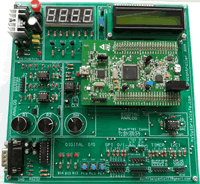
Fig.1. LCD character and Discovery board trainer connection
Fig.2. LCD Character Interface
HD44780 Library
Features
4bit operation mode
Minimum GPIOs used (6)
Supports different LCD sizes
Supports up to 8 custom characters
Enable/disable cursor blinking
Show/hide cursor
Shift content in ram left/right
Connection pins to board are user selectable
Automatically jumps to new line when you reach max X on LCD
Strings with \n, \r or \n\r
With \n in string LCD jumps to lower line, but X position stays the
same
With \r in string LCD jumps to the beginning of the line
With \n\r in string LCD jumps to the beginning of a new line
Library dependencies
CMSIS
STM32F4xx
STM32F4xx RCC
STM32F4xx GPIO
Fig.3. Add Files header HD44780.h and source file HD44780.c
Fig 4. CMIS Library for LCD Character
#include "stm32f4xx.h"
#include "stm32f4xx_rcc.h"
#include "stm32f4xx_gpio.h"
#include "HD44780.h"
#include "stdlib.h"
#include <stdio.h>
int main(void)
{
	LCD_ConfigurePort(GPIOD,GPIO_Pin_7,	GPIO_Pin_5,	GPIO_Pin_6,0,0,	0, 0,GPIO_Pin0,	GPIO_Pin_1, GPIO_Pin_2,	GPIO_Pin_3);
	//                      RS          RW          EN                   D4 D5 D6 D7
	LCD_Initalize(BUS_WIDTH_4, DISPLAY_LINES_2, FONT_5x8);
 //Put string to LCD
	LCD_MoveToPosition(0x00);
 LCD_Print("Percobaan LCD");
 while (1)
    {
    }
}
|