|
||||
|
||||
|
|
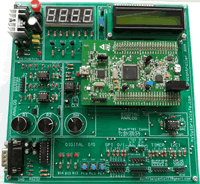
Basic Experiment Microcontroller ARMSTM32F4 - With Coocox IDE What will you do, after you bought ARM modul, for example:
Discovery STM32F407. The difficult thinks are how to use it. First of
all, you need the software and how to configure the board. In this lesson,
you will learn how to do it. Why we are always do first experiment with LED ?. LED
is a simple component that we are almost know it, how it works. Before
you can control this LED, you need to know how it connect to the PORT.
In this lesson, you will learn how to connect LED with the board. Switch is almost used for human interaction with system,
in this experiment, we used switch push button, which it will interact
with LED. Display 7 segmen are compose of some LEDs, Display
7 segmen used in this experiment are seven segment common anode. In
this lesson, you will learn how to display a number to 7 segmen. It’s time to write about a more complex but interesting connection with the STM32F4-Discovery board. Since I started developing with electronics, I’ve found a lot of applications in which an LCD is needed or can be an added value. We will interfacing HD44780 (and its compatible) driver for alpha-numeric LCDs. Library supports up to 20 x 4 LCD size. It was tested with 20 x 4 (on picture) and with 16 x 2. In many embedded projects microcontroler, we have to deal with signals directly from nature, like temperature, pressure, current, etc... Theses signals are analog by default and in most of cases we use sensors that converts these analog signals to analog electrical voltage to be injected in the microcontroller to do some work. For this purpose, microcontroller's manufacturers usually incorporate an ADC into the microcontroller. ADC is actually stands for Analog to Digital Converter. In this lesson, I'm going to use the STM32F4 discovery board to interface an analog input provided by a potentiometer and visualize the received data with LCD Character or sending it to Serial comm.
Generating an periodic Sinus waveform using a DAC directly from look up table. 8. Serial Communication RS232 USART on STM32F4 A lot of times when you work on some project, you want
to display data on computer. This can be done with USART peripheral
on MCU STM32F4. With USART you can connect more than just computer,
you can connect with GSM modules, GPRS, bluetooth and so much more.
Our discovery board supports up to 8 USART channels. In this tutorial
we will use USART3 to show principle how to use USART in our project.
But first, we have to initialize our pins and peripheral. Generating an periodic Sinus waveform using a DAC with DMA and TIM6 as a trigger. 10. STM32 F4 DAC DMA Waveform Generator 11. Working
with stm32f407 ADC+TIMER+DMA 12. STM32F407 ADC Six Sample Analog input In this experiment, we will show you how get data from six analog input, @ 40 KHz via PORT PA.0, PA.1, PA.2, PC.0, PC.1, PC.2, microcontroller STM32F407 13. STM32 ADC Interrrupt Time Sample for two channel analog input ADC In this experiment, we will show you how to get data from two analog input with sampling rate @ 200 KHz on PORT PC.0 and PC.1 14. STM32F4 Discovery HARDFPU - CooCox CoIDE Floating Point First time, you are using this microcontroller and
you want to send or process some arithmatic floating point, then you
may have the problem with it. Here, are step by step that I use to configure
my project. In this lesson you can also download the file that I have
already configured. Here is the experiment that will show you, the comparation
betwen processor transfer and DMA transfer memory to memory.
|
|||
    |
||||