|
||||
         |
||||
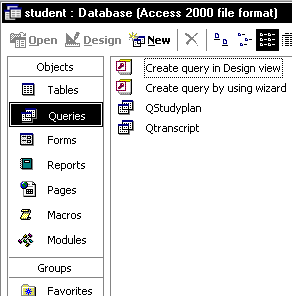
1.With the "Queries" tag selected, double click
on "Create query in design view" as shown below.
2 In the resulting window Query1: Select Query, choose
tables that will be connected to each others, as shown in the picture
bellow. 3. Make a relationship, for table to give a detail explanation. You can do it by drag and drop record from table to others table, as shown in the picture bellow. 4. Save the Query as "QStudyplan" by typing
the name into the text box and hitting "OK". 5. Repeat step 2- 4 for the rest of the query 6. Go look at "Queries". You will see that
QStudyplan and Qtranscript have been created.
|
Lesson
1 Creating a Document from Templete. Creating an Editable Region Templete
Creating Tabel Academic Database Creating
Query Academic Database Building Insert Record for Student Data Building
Insert Record For Study Planning Building Edit Records for Study Planning Lesson
4 |
|||
copyright
2006 - www.web-database.mytutorialcafe.com |
||||